

Country

Choose your country

AustraliaGlobal website

Solo operators

Give yourself room to treat and grow.

For independent cosmetic, aesthetic and laser practitioners doing the clinical work and running the practice. Bring clinical records, consent and medication workflows together in one system, and start with ready-made automations for recurring patient contact. Customise the follow-up to suit your practice, with room for the conversations that need you.
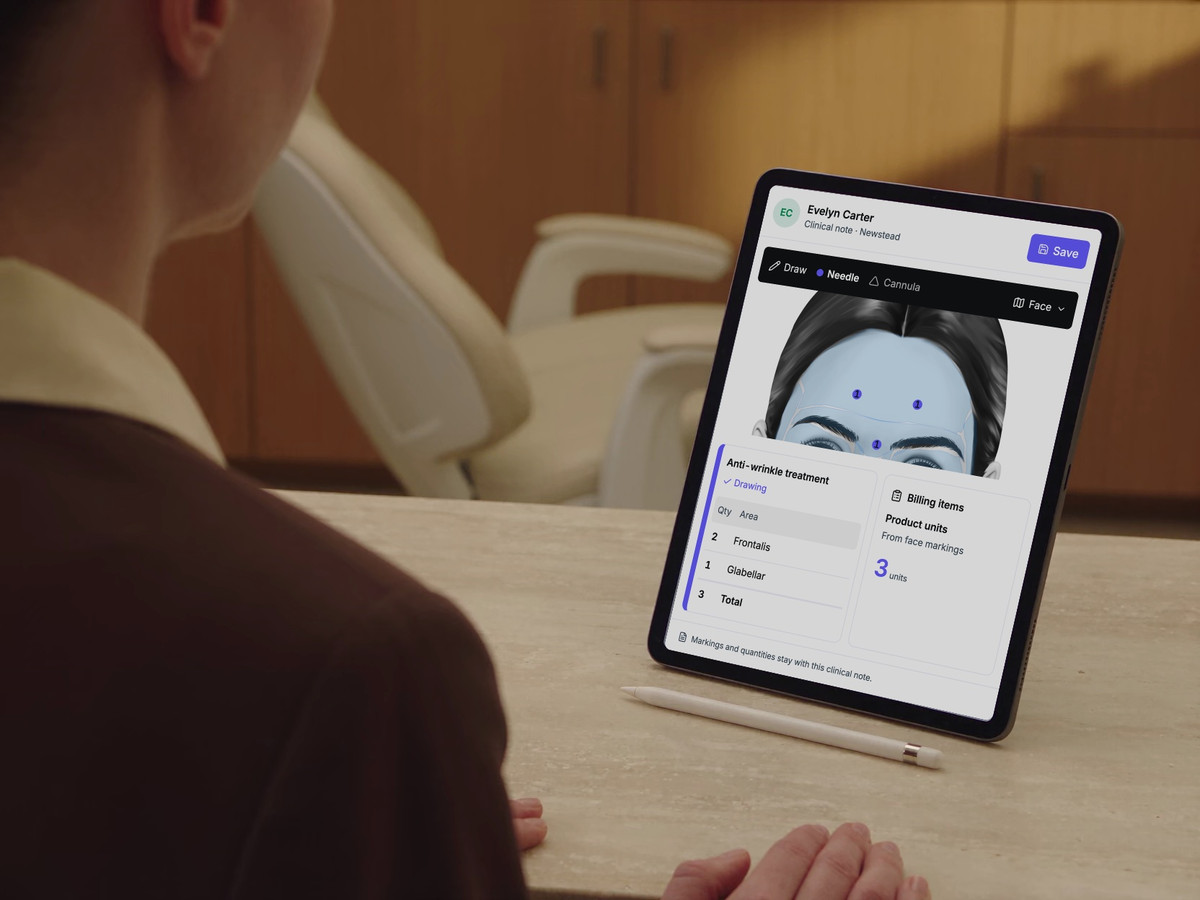
Clinical note preview. Practitioner markings identify Frontalis and Glabellar areas and update the recorded quantity. Unit billing follows those quantities. Consent and form states stay separate.

Start with the treatment note: patient context, visit requirements and the record of your care. You review what is appropriate for this visit.

Built around your day

Keep the relationship moving between visits.

Reminders and personal follow-up help maintain relationships and keep the diary moving. Repeating that work competes with treating, keeping clinical records and developing your practice. Start with ready-made appointment, aftercare and treatment follow-up automations, alongside your clinical record and patient plan. Review and customise what your practice needs, whether you are starting out or already established.

Explore compliance support
A practitioner reviews a DappleOS treatment note on a supported iPad in her clinic.

One system. Fewer separate tools.

Separate tools mean you carry patient context between systems while also treating. DappleOS brings online booking, marketing, digital consent, clinical photos and injectable scripting into one system, so you have fewer hand-offs to manage alone. Start with ready-made follow-up, customise where needed, and keep relevant access and prescribing decisions with your own authorised practitioners.

Compliance support

Keep clinical responsibilities part of everyday care.

The problem
Running independently still means keeping clinical records and consent in order. If you provide injectable treatments, medication records and coordination with your prescriber also need a place in the working day.
How DappleOS helps

Digital drug book

Review recorded Schedule 4 medication movements by product, batch, expiry and location. Where note-based stock updates are enabled, saved treatment use links the movement to the patient and person who recorded it. Daily balance views support reconciliation where enabled.

Explore the digital drug book
Injectable scripting

Request an injectable script from the clinical note, with patient history, treatment details and consent in context. Your clinic’s configured prescribers review the request and record their decision. Issued scripts retain signature and validity details.

Explore injectable scripting

Consent and clinical records

See which configured forms still need completion, then review captured answers and signatures alongside the clinical note. Keep the record of consent, treatment and follow-up available for the next authorised colleague.

Explore forms and consent
What this means for your clinic
Bring consent, clinical records, the digital drug book and injectable scripting into your everyday workflow, with the treatment and prescribing decisions staying with the authorised practitioners.

Your consultation

Start with a clear record of the consultation.

The problem
The next consultation needs earlier findings, forms and the plan. Those details need a reliable home beyond your memory.
How DappleOS helps
Clinical notes bring patient history and recorded visit requirements into view. Review form completion, record photos, findings and anatomical markings where relevant, then connect reviewed findings to a treatment and skincare plan you can revisit.
What this means for your clinic
Build on the previous consultation with the patient's context in view, while keeping clinical decisions with you.

Start with the treatment note: patient context, visit requirements and the record of your care. You review what is appropriate for this visit.

Patient self-service

Help patients return to the plan, and to you.

The problem
A recommendation can lose momentum after the consultation if the patient cannot easily return to the plan or arrange their next visit.
How DappleOS helps
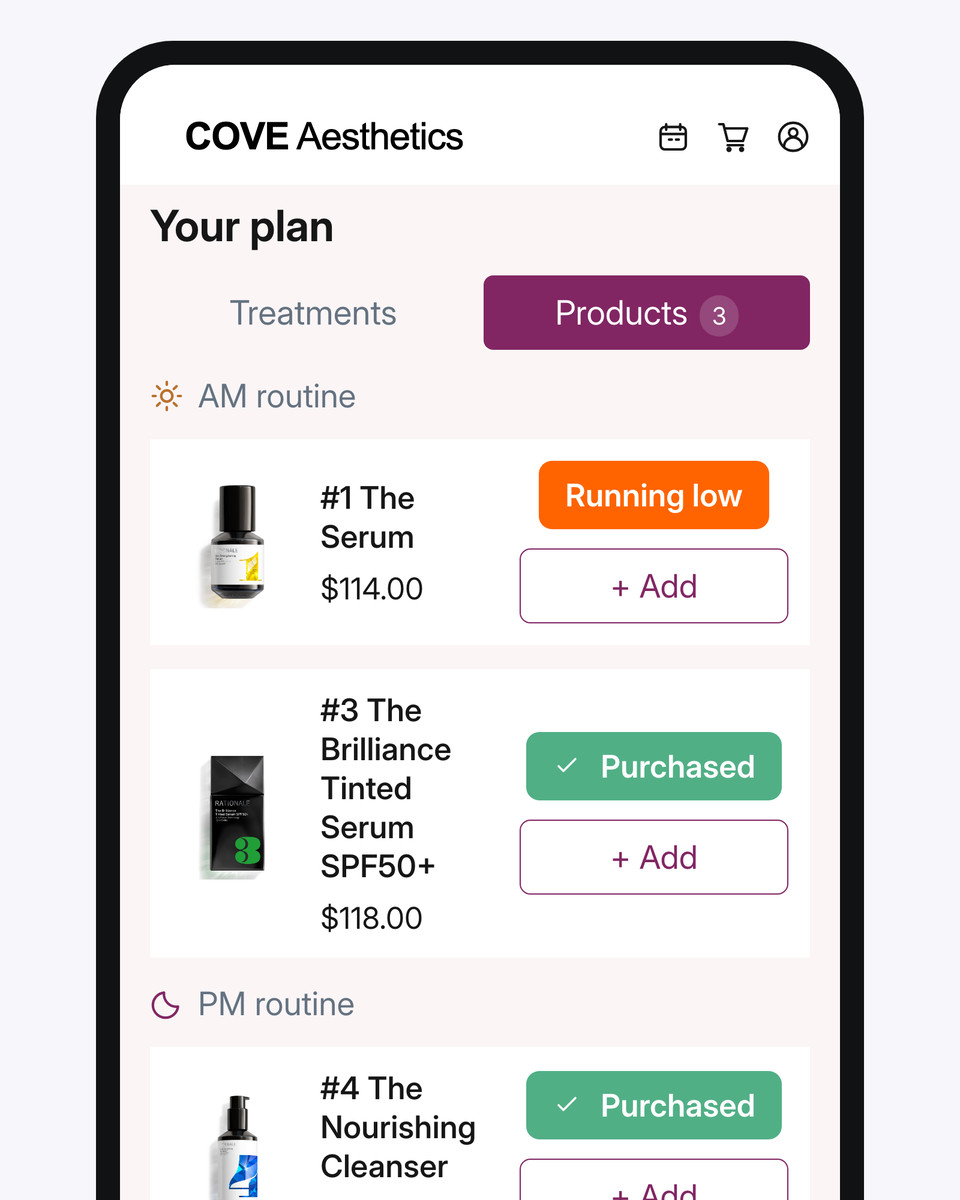
Your branded patient app keeps planned treatments, reviews and skincare together. Patients can revisit their plan and choose eligible appointments through browser booking, without installing an app. You control available booking options and public treatment names.
What this means for your clinic
Patients have a clear place to return to their next steps, helping you maintain the connection between visits.
The clinic-branded patient app displaying the patient’s treatment and skincare plan.

Patients return to the plan in their clinic's branded experience. A planned treatment and its booked appointment remain distinct.

Recurring administration

Start with ready-made follow-up for your practice.

The problem
Finding patients, extracting lists and rebuilding reminders compete with consultations, even though that contact matters to the relationship and diary.
How DappleOS helps
Start with ready-made automations for appointment messages, aftercare, treatment reminders and follow-up. Review the messages and timing, customise them where needed, then start the workflow. You can inspect each patient's journey and the action it reached.
What this means for your clinic
Keep recurring contact going without rebuilding every step, leaving your personal attention for the follow-up that needs you.

A ready-made workflow gives you a starting point to review and customise. Its journey history shows what ran; a completed journey is separate from a booking.

The patient relationship

Keep the personal part personal.

The problem
Some follow-up needs your voice, but remembering each personal conversation adds another task to a day of consultations.
How DappleOS helps
Review and edit a personal aftercare message alongside your clinic's treatment guidance. A configured automation can create a patient-linked task when a conversation is needed, and Inbox keeps the ongoing exchange connected to the patient.
What this means for your clinic
Keep the relationship personal, with a recorded next action to return to and clinical advice under your control.

The note provides the context for a personal follow-up. Saving the note or message is separate from sending it.

Your practice

Make room to develop the practice.

The problem
Today's consultations and recurring work can leave little room to consider where your time and resources would help the practice develop.
How DappleOS helps
Reporting shows appointment and sales activity for a defined week or month, keeping future bookings, invoice sales and money received distinct. A separate stock view shows quantities, incoming orders and reorder suggestions to inform purchasing.
What this means for your clinic
Use that context to decide where to focus your time and resources, whether on treating, clinical capacity or a device investment.

Review the period and the detail behind the report before deciding where to focus your time and resources.

Trust and compliance

Clear context. Appropriate control.

Keep responsibility with the people who know your patients and your business.

Feature availability depends on your plan, enabled features and access permissions.

  • Encrypted storage
Explore our Trust Centre
Your follow-up rules
You review and start the ready-made workflow, with messages and timing you can customise. A matching segment does not determine clinical suitability or permission to market.
Your clinical judgement
You review findings, choose suitable recommendations and edit the personal aftercare message. The clinic supplies the treatment guidance.
Your booking choices
You control online treatment visibility and patient-facing names. Protected patient information requires the appropriate sign-in, even when patients use a browser.

FAQs

Can DappleOS bring my separate clinic tools together?

DappleOS brings online booking, marketing, digital consent, clinical photos and injectable scripting into one system around the patient record. For recurring contact, start with ready-made automations and customise where needed. Your clinic controls access and uses its own authorised prescribers. Bring your current tools to a demo so we can check which workflows DappleOS covers and where a separate service or connection is still needed.

How does DappleOS support clinical records and medication workflows?

Clinical notes and completed forms keep the recorded care and consent available for review. For injectable services, the digital drug book provides Schedule 4 medicine transaction history, while injectable scripting connects requests and patient context with your own authorised prescribers. The prescriber reviews and makes the decision. These tools support your workflow; you remain responsible for the care, records and obligations that apply to your practice.

Do I need to build my own automations?

No. Ready-made automations provide starting points for appointment messages, aftercare, treatment reminders and follow-up. Choose the workflow you need, review its messages and timing, and customise it for your practice before starting it. A demo can show the relevant starting points and setup. Creating or saving a workflow does not start it, and sending a message does not mean a patient has booked.

Can I follow up without rebuilding patient lists every time?

For routine appointment and treatment contact, start with the relevant ready-made automation. When you need a particular audience, Patient segmentation can use recorded treatment history and booking context, with dynamic segments refreshed through scheduled or manual processing. Review the purpose, audience and communication permissions; saving a segment does not send a message.

Do patients need to install an app to book?

No. Patients can use your clinic's branded booking experience in their browser and continue into the web patient app. Protected patient information still requires the appropriate sign-in. The treatments, appointment choices and self-service actions available follow your clinic's configuration.

Can follow-up still feel personal?

Yes. You can add an editable personal message from the clinical note alongside clinic-authored treatment guidance. A configured automation can also create a patient-linked task when a personal call is appropriate, and Inbox supports the ongoing conversation. The practitioner retains responsibility for clinical advice and the personal response.

Is this relevant to an established solo practice?

Yes. This is about how you operate, not how recently you opened. An established cosmetic, aesthetic or laser practice still needs to maintain patient relationships while the owner treats and develops the business. We can focus a demo on your clinical records, patient next steps and recurring follow-up, using the services you actually provide. Growth does not have to mean adding colleagues or locations.

What changes when I bring in my first colleague?

The next priority is helping an authorised colleague understand the patient's earlier consultation, current plan and next action. The single-location clinic story shows how clinical records, shared planning and patient-linked tasks support that handover. We can use a demo to map the responsibilities and access your team will need.

Ask DappleOS

Ask how DappleOS could fit your clinic, or bring your own workflow question to the team.

Book a demo

Let’s work through your clinic’s day.

Bring one patient journey and the follow-up you repeat. We will start with your clinical record, consent and relevant medication workflow, then show the ready-made automations that fit. Review what you can customise and where personal attention matters, alongside your plans for the practice.

Book a demo