Concierge Agent for aesthetic and cosmetic clinics
Stay on top of patient enquiries.
Answer patient enquiries with your clinic’s information and their history at hand. Check booking options, help them take the next step and bring conversations that need a person into your DappleOS Inbox.
Coming soon. Not yet available to customers.
Channels depend on your clinic’s setup.
At a glance
The enquiry arrives. Your team is already busy.
A new booking question, a patient changing plans, a message waiting for a reply. Preview how Concierge keeps the conversation moving, with the next step and the patient’s context visible to your team.
Turn an enquiry into a booking.
Offer eligible times and record the appointment after the patient confirms.
Keep reception in the conversation.
See the exchange and booking outcome together in your clinic Inbox.
Hand over with the context intact.
Bring questions that need a person to your team, ready for a staff reply.
Phone calls
Phone calls, with a clear next step.
The phone rings while reception is helping someone else. Concierge can answer clinic questions and help callers book, move or cancel an appointment, using your clinic’s information and booking rules.
- Answer questions about your clinic, hours and booking options.
- Check identity before accessing a patient’s record or changing a booking.
- Bring in your team when needed, or take a message for the clinic Inbox.
Phone is configured separately. Plans, rewards and saved-card deposit conversations stay in messaging. Appointment changes require the patient’s confirmation.
The patient's own context
Connected to your clinic. Aware of the relationship.
Concierge uses the clinic information and patient records behind the conversation: availability, locations, hours, booking rules, prices and deposits. New enquiries and existing patients can have different booking options. The clinic’s rules determine what can be offered; Concierge does not decide clinical suitability.
A new enquiry
Offer the options allowed by your clinic’s new-patient rules.
An existing patient
Use the recorded plan and check booking eligibility before offering times.
Your clinic’s availability
Check the diary, location and clinic hours before offering a time.
Your booking rules
Use eligible options, treatment prices and deposit requirements from your clinic’s setup.
Their existing record
Use recorded appointments, plans and preferences where the channel and access allow.
From enquiry to your clinic Inbox
Easy to arrange. Easy to see what happened.
The patient asks for a consultation, chooses an available time and confirms the details. Your clinic sees the same exchange and the successful booking in Inbox. No separate message for reception to copy into the diary.
- Real booking rules. The options follow the patient's booking eligibility and the clinic's availability.
- A clear yes. The patient confirms the treatment, practitioner, location and time before the booking is made.
- A result to review. A proposed time becomes a confirmed booking only after the appointment is successfully recorded.
Your team, at the right moment
Some questions need a person. Keep them in view.
Clinical questions, complaints, billing disputes and requests for a person belong with your team. Needs attention brings those conversations forward, with a short note explaining why. A staff reply takes over the conversation.

The question, patient and existing appointment stay together. Your team can check the upcoming visit and reply as themselves, without asking the patient to start again.
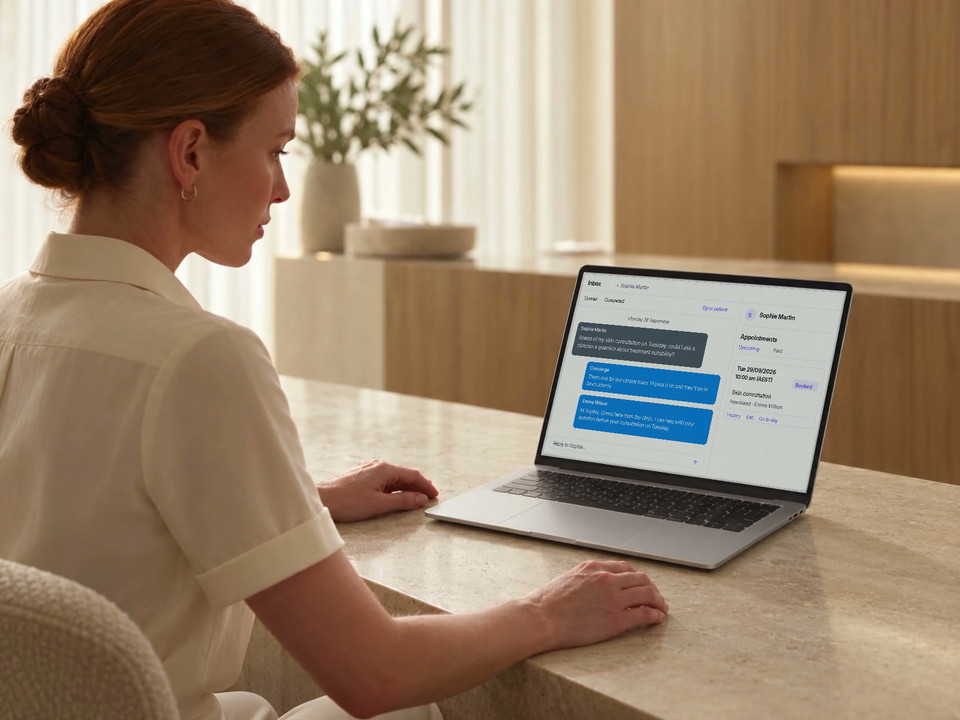
The question stays with the patient. Messages and appointment details from the same Inbox thread.
The appointment is already booked. Staff reply to the clinical question; this exchange does not change the booking.
Keep the enquiry moving
A pause doesn’t have to end the conversation.
When a patient goes away to check their diary, their enquiry can lose momentum. Concierge can follow up an unfinished booking conversation and help them take the next step.
- Check whether the patient has already booked before sending.
- Continue the existing enquiry, with its context intact.
- Respect the location’s send window and whether Concierge is still enabled.
Planned Concierge workflow. A follow-up message is separate from a confirmed booking or a marketing campaign.
When the diary changes
Help the patient find another time.
A cancellation request can begin with an offer to move the appointment. Concierge checks the alternative and asks the patient to confirm. If they still want to cancel, it follows that choice instead.
- Check availability for the new date and time.
- Read back the change to the existing appointment.
- Confirm the successful move in the same conversation.
A time is either booked or available. Concierge does not offer a tentative hold while the patient decides.
Around the booking
Support the next step, too.
Make deposit requirements clear and help the patient take the next step, using your clinic’s booking setup.
Make the deposit clear before the patient agrees
Any required deposit is disclosed before the booking. In messaging, the patient can use a payment link or explicitly approve a charge to a named saved card for the stated amount.
A payment link is available when there is no saved card, the patient prefers it or a charge fails. Phone uses the payment-link path.
This example starts after a booking, with its previously disclosed $50 deposit still unpaid. A booked appointment and a paid deposit remain separate states.
Your clinic's view
Review the conversations and what happened next.
The Concierge view in Inbox brings handled conversations together. Needs attention brings forward threads requiring a person. Review the actual exchange and appointment outcome, including whether a requested cancellation became a reschedule.
Know which conversations need your team.
With Concierge enabled, use Needs attention in Inbox to find conversations waiting for a person. Review the exchange and the linked appointment before replying.
- Use the Concierge view to review conversations it is handling or has handled.
- Check the team’s reply separately from the request for a handover.
- Check the conversation and appointment record before treating a request as resolved.
Which conversations need a person?
What did the patient confirm?
Was an appointment booked, moved or cancelled?
Sent, delivered and read describe different message states. A handover or message taken does not mean staff have completed the follow-up. Check the recorded appointment and payment outcomes separately.
See the shared clinic InboxTrust and compliance
Your patients are supported. Your clinic stays in control.
Give Concierge a clear administrative role, with patient confirmation, the clinic's rules and human judgement in the right places.
Feature availability depends on your plan, enabled features and access permissions.
- Encrypted storage
- The patient confirms
- A booking, appointment change or deposit needs a clear yes to the specific details. Completion is confirmed after the action succeeds.
- Their own record
- Patient-specific context is tied to the person in the conversation. Phone identity is checked before their record is accessed or a booking is changed.
- Your team takes over
- Clinical questions, complaints, billing disputes and requests for a person need staff attention. Sending a staff reply takes over the conversation.
- Your clinic's rules
- Booking eligibility, treatment information and deposits come from your clinic's setup. Messaging and phone are enabled separately.
FAQs
How does Concierge Agent help patients and reception?
Concierge Agent is coming soon and is not currently available to customers. The planned workflow covers clinic questions, appointment requests and changes through conversation, with staff able to review the exchange and follow up in Inbox.
Can it book, move and cancel appointments?
Yes, for appointments permitted by the clinic's booking rules and the enabled channel. Concierge checks the options and asks the patient to confirm the specific treatment, date, time, practitioner and location before a change is made.
Can it take a booking deposit?
Deposit requirements are disclosed as part of the booking. In messaging, a patient can explicitly approve a charge to a saved card or use a payment link. Phone uses the payment-link path rather than saved-card capture, and a booking confirmation does not mean the deposit has been paid.
What happens when a patient needs a person?
Clinical questions, complaints, billing disputes and requests for a person are brought to the clinic team. Staff can review the conversation in Needs attention; sending a reply takes over from Concierge. It does not diagnose, recommend treatment or decide suitability.
Which channels are planned, and do they work the same way?
The planned channels are voice, Facebook, Instagram, email, SMS and chat in your clinic’s branded patient app. Website chat is separate. Channels need to be connected and enabled; phone has a narrower scope than messaging, with identity checked before patient information is accessed. Concierge Agent is coming soon.
Can it follow up a patient who enquires but does not book?
Concierge can follow up an unfinished booking enquiry. Before sending, the workflow checks whether the patient has since booked, whether Concierge remains enabled and whether it is within the location's send window. It continues the enquiry rather than starting an unrestricted marketing campaign.
Can our team review Concierge conversations?
Yes. With Concierge enabled, Inbox includes a Concierge view for conversations it is handling or has handled, and Needs attention for threads requiring a person. Review the actual exchange and appointment record. A handover request is separate from the team’s reply or a completed booking change.
What will we review in a demo?
Concierge Agent is coming soon. Bring your patient-enquiry and booking workflow. We can explain the live booking and Inbox features, discuss the planned Concierge Agent workflow, and confirm its availability.
Ask DappleOS
Ask how patient conversations, booking and staff handover could fit your clinic.
Connected to the rest of the clinic
Keep the next step close.
Web Chat
Bring Concierge responses and staff handover into your clinic website chat.
Inbox and messaging
See patient conversations and staff follow-up together.
Online booking
Explore the booking rules behind the appointment options.
Meet the DappleAI agents
Find the agent that fits each part of your clinic's work.