
Email and SMS broadcasts for aesthetic clinics
Give every campaign a goal.
Start with the patients you want to reach. Prepare a personal email or SMS, review it before sending, and measure the qualifying bookings or purchases that follow. Keep the campaign connected to your clinic.
At a glance
A campaign with a clear next step.
The audience, the message and the outcome belong together. Bring your clinic’s patient information into the campaign, then give the result a defined measure.
An audience with a reason.
Choose a saved patient segment built from the information in your clinic.
Your clinic. Their context.
Bring patient names, clinic details and relevant links into each message.
A preview before a send.
Review the template and send a personalised test to your team.
A goal beyond the click.
Define the booking or purchase you want to measure, and the window it counts within.
See what followed.
Read message performance beside qualifying goal results.
Choose who to reach
Start with a reason to get in touch.
Invite the patients a message is relevant to. Choose a saved segment, review its latest audience and channel counts, then keep that audience attached to the broadcast.
- Patient information already in DappleOS
- Saved segments for a repeatable audience
- Email and SMS preferences checked at send
Already connected
Your audience stays with the campaign.
Select a saved patient segment and review its latest counts. The clinic data that defines the audience stays in DappleOS, ready for your next relevant message.
Channel counts show available contact details. Subscription preferences are checked when sending.
Define success
Decide what you want the message to achieve.
A click is useful. A qualifying booking or purchase answers a different question. Set one conversion goal for the broadcast, choose any eligible activity, a specific item or a tag, and define the time window.
- Booked treatment or purchased something
- Any, specific item or tag-based target
- 7, 14, 30, 60, 90 days or any time
A booking goal.
A purchase goal.
For a separate skincare follow-up, measure a qualifying purchase from the selected product tag within 30 days.
Explore skincare purchasingOne defined goal per broadcast. Your clinic chooses the target and the window; saving a goal starts its measurement.
“Before sending a campaign, decide what a useful outcome looks like. Opens and clicks tell part of the story. Bookings and purchases connect it to the business.”
Make it personal
A familiar voice. A relevant message.
Create reusable email and SMS templates for your clinic. Use the patient’s name, home-clinic details and branded patient-app link so each message has the right context.
- Clinic branding and reusable message templates
- Patient and home-location merge fields
- Conditional content for locations and brands
Review before sending
See it before your patients do.
Choose a patient for the personalisation context and a test address or mobile for your team. Read the finished message, check its links, then decide when you are ready to send to the audience.
Choose the context. Control the recipient.

A message worth taking a moment for.
Review the finished message from the patient’s point of view, before choosing to send it to the audience.
Performance and goals
The message. The response. The result.
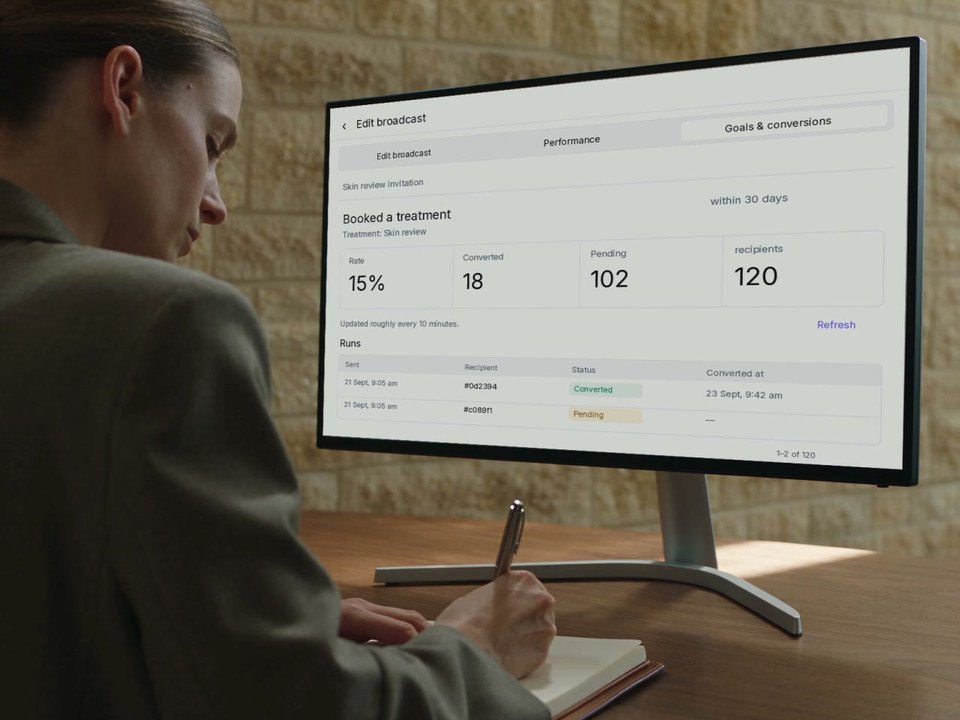
See sent, delivered, opened and clicked activity in Performance. Each describes a different stage of the message. Then look at Goals and conversions for qualifying bookings or purchases and the recipients whose measurement window is still open.
Qualifying bookings, with the goal in view.
From a result to a conversation
What would you change next?
Consider the audience, the message and the qualifying outcome together before shaping the next campaign.
Give the next conversation some context.
Use the recorded result to decide what to explore next, alongside what your team already knows about the clinic.
An email metric has its own meaning.
A closed window tells another story.
Recorded outcomes. A clearer view.
A qualifying activity after a message is useful evidence. It is not proof that the campaign caused a booking or purchase, or that a booked treatment was completed.
Connected to your clinic
Less list copying. More useful context.
Choose the audience, prepare the message and review its goal in the same clinic system. Keep the patient information and qualifying activity together instead of manually matching campaign lists to appointment and purchase records.
Segments define who.
Build and maintain an audience using the patient information already in your clinic.
Explore segmentsAutomations define when.
Use configured events and conditions for an ongoing journey, alongside your deliberate broadcasts.
Explore automationsTrust and control
Your audience. Your review. Your send.
Your clinic chooses the message and who it is for. Keep subscription preferences, review and measurement boundaries clear.
Feature availability depends on your plan, enabled features and access permissions.
- Encrypted storage
- Channel preferences
- Email and SMS sends check the relevant subscription preference and include an unsubscribe link.
- A deliberate test
- Select the patient context and the test recipient. A test does not send the broadcast to its audience.
- Controlled access
- Marketing permissions control access to campaign performance. Patient results use de-identified recipient references.
- Defined measurement
- Goals use the selected target and window. Changing a goal starts a new measurement version; recorded outcomes are not a claim of causal lift.
A little more detail
FAQs
Explore how the audience, test message and goal fit together. Then talk through a useful first broadcast for your clinic.
Book a demoCan we review bookings or purchases recorded after a broadcast?
Set a booking or purchase goal, choose what qualifies and define its measurement window. Goals and conversions shows qualifying outcomes for recipients, including converted, pending and not met results. These are recorded outcomes after the message, not proof that the broadcast caused a booking or purchase.
Can we target patients using information already in DappleOS?
Yes. Choose a saved patient segment instead of rebuilding a mailing list elsewhere. Segments can use patient and treatment information, while the broadcast shows audience and channel counts. Subscription preferences and available contact details still determine who can receive the message.
Can we send both email and SMS broadcasts?
Yes. Prepare email and SMS messages using the clinic’s saved templates. Email gives you room for a branded invitation, while SMS supports a concise message and link. Each channel uses the patient’s relevant contact details and subscription preference.
Can messages reflect the patient's own clinic?
Messages can use patient names, clinic branding, the patient’s home-location details and the clinic’s branded patient-app link. Conditional content can give different locations or brands their own message within a broadcast. Your team prepares and reviews that content.
Can we test a message before sending it to the audience?
Yes. Save the draft and choose a patient to supply the personalisation context, then send a test to the email address or mobile number your team specifies. The test is separate from the audience send, so you can review the message before deciding to send the broadcast.
How are unsubscribed patients handled?
Broadcast sends check the relevant email or SMS subscription preference and include an unsubscribe link. Audience membership alone does not make someone eligible to receive every channel. Your clinic remains responsible for the audience and content it chooses.
Does a sent or delivered message mean the patient acted on it?
No. Sent, delivered, opened and clicked are separate message events, where available for the channel. Review qualifying bookings or purchases in Goals and conversions. A delivery event or a recorded outcome does not prove the message caused the patient’s decision.
When would we use a broadcast instead of an automation?
Use a broadcast for a deliberate message to a selected audience, such as a clinic update or review invitation. Use an automation for a configured journey that starts from an event and follows its own conditions. Both can use connected patient information and goal reporting.
Ask DappleOS
Explore the feature with Ask DappleOS, or talk to our team about your clinic.
Talk to the DappleOS team