Branded patient app & portalGive patients a clinic-branded home for bookings, plans, results, messages and payments.Online bookingControl who can book what and the names patients see, with a branded booking flow on the web or in your patient app.Treatment add-onsOffer configured extras alongside a treatment, with clear patient choice and linked appointment handling.Waiting list automationOffer eligible openings to matching waiting-list patients and follow the booking result.Inbox & messagingBring secure patient communication and team handoffs into one contextual inbox.Digital intake before arrivalSend required forms securely and make outstanding paperwork visible to the team.Plans and patient next stepsKeep treatment plans and supported shared information accessible through your clinic’s branded patient app.Concierge AgentComing soonAnswer patient questions and handle supported booking requests through conversation, with completed work and staff follow-up visible in Inbox.
Patient experience
Patient portal software that keeps every next step connected
Give patients one clinic-branded place for the booking, forms, plans, messages, shared information and payment features your clinic enables.
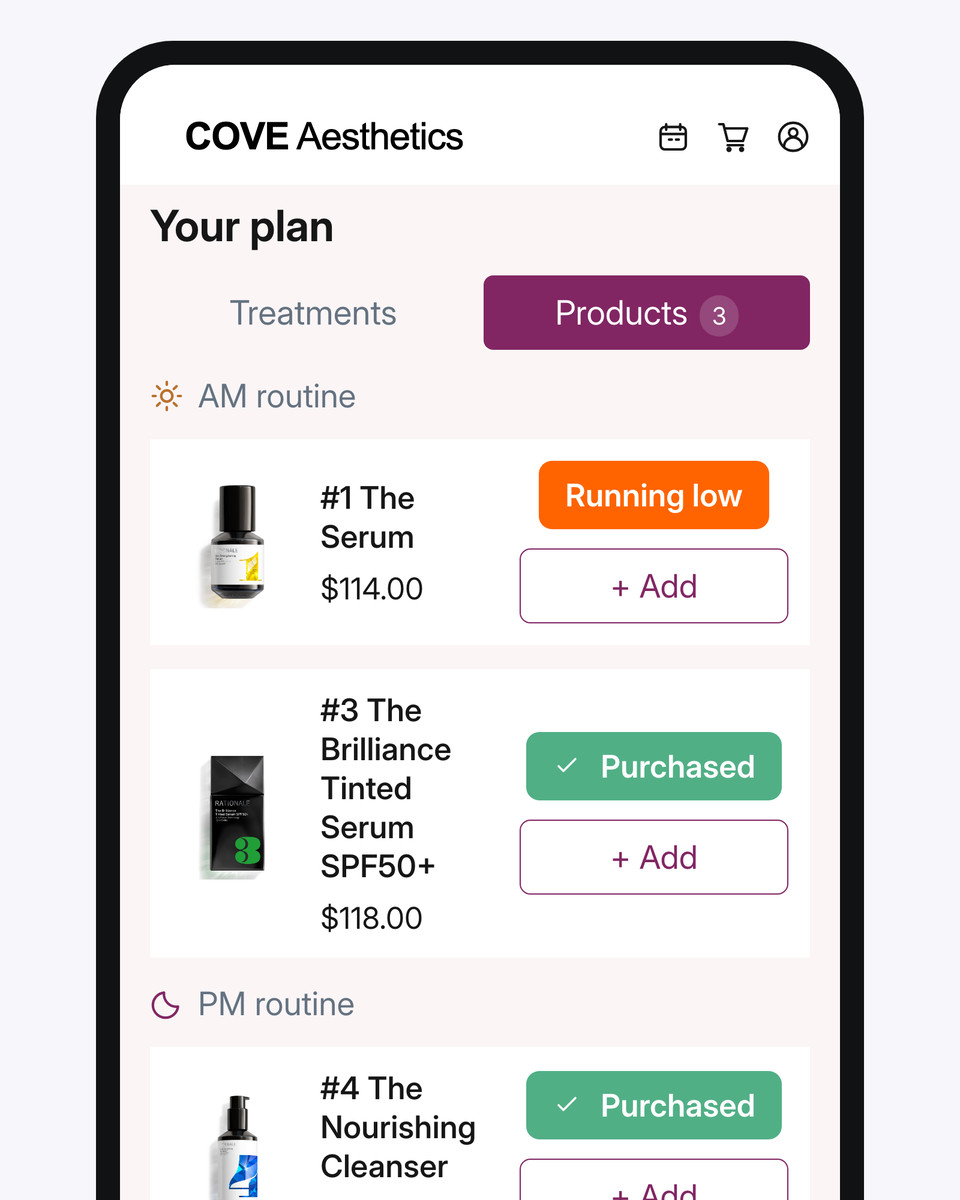
At a glance
Give patients one clinic-branded experience before, during and after care.
Branded patient app & portal
Give patients a clinic-branded home for bookings, plans, results, messages and payments.
Online booking
Control who can book what and the names patients see, with a branded booking flow on the web or in your patient app.
Inbox & messaging
Bring secure patient communication and team handoffs into one contextual inbox.
Digital intake before arrival
Send required forms securely and make outstanding paperwork visible to the team.
All capabilities
Patients can book, complete required forms, review appointments and treatment plans, message the clinic, access shared results or scripts, and manage enabled payments or purchases through the clinic's branded patient app. Each action stays connected to the same DappleOS record used by the clinic team.
In practice
Prepare for the visit with clearer next steps
Supported online booking and digital forms give patients a path into the clinic's workflow. Appointment, form and payment context stays connected to the patient so reception can see the relevant status without rebuilding it in another system.

Trust and control
Your clinic stays in control.
Clinics configure the patient-facing modules, branding and access methods that are enabled. Protected sign-in options, short-lived access links and permission controls support the patient entry point while the clinic remains responsible for its rollout and patient communications.
Feature availability depends on your plan, enabled features and access permissions.
- Encrypted storage
- Authorised access
- Map clinical, operational and reporting access to the records and actions each role needs.
- Configured workflows
- Review enabled modules, templates and actions against your clinic's services before the team starts using them.
- People remain responsible
- Clinical judgement, patient communication and the interpretation of recorded activity remain with your team.
Keep the experience connected as your clinic grows.
Keep your clinic brand and the patient's next step clear as more people join the journey.
- Solo and small clinics
- Help patients revisit the plan and complete supported actions between appointments.
- Growing clinics and teams
- Give practitioners and reception the context to follow up without asking patients to repeat the same information.
- Clinic groups and franchises
- Discuss brand configuration, supported location access and account boundaries to understand the patient experience available across independent clinics.
FAQs
How does the patient experience reduce front desk work?
Patients can complete common actions such as booking, paying a deposit, reviewing their plan and accessing enabled information through the clinic's branded patient app. Those actions return to the same appointments, invoices and patient record used by the team, which removes avoidable re-keying between separate systems.
Will the patient app look like our clinic?
Yes. The experience can use your clinic's logo, colours, styling and web address, with the enabled areas configured for each brand. A demo can show how the app would be presented for a single clinic or a multi-brand group.
What can patients do in the clinic's branded patient app?
Depending on the capabilities your clinic enables, patients can book appointments, review their treatment plan, complete required forms, message the clinic, access shared scripts or results, make payments and purchase eligible products, packages or memberships. The clinic decides which parts of the experience are available.
Does the patient app stay connected to the clinical record?
Yes. The appointment a patient books, the plan they review and the message they send use the same connected DappleOS record as the clinic team. That means the clinic does not need to export a plan or reconcile patient activity with a separate portal database.
What patient experience reporting is available?
Authorised teams can review patient-app adoption by clinic location, compare online and internally created bookings, and monitor future booking status and visit cadence. Purchases made through enabled patient experiences also remain connected to the clinic's invoice and revenue reporting.
Can patients reschedule appointments themselves?
Where self-service rescheduling is enabled, patients can manage an appointment within the rules set by the clinic. Availability, treatment and practitioner constraints still come from the connected DappleOS scheduling workflow.
What is involved in launching the patient experience?
The implementation team will map your clinic brand, web address, enabled patient areas, booking rules and relevant payment or purchase settings. During a demo, the team can also review your current booking, portal, messaging and ecommerce tools so the rollout scope is clear before anything changes.
What will we see in a demo?
A DappleOS team member can walk through the patient journey from booking to follow-up, show what the clinic controls and explain how each patient action returns to the clinic record. The conversation can focus on the patient experience, reporting and systems your clinic most wants to improve.
Ask DappleOS
Ask how DappleOS patient experience could fit the way your clinic works.